Context
In most cases when someone write about the Decorator pattern it is usually related to UI stuff. The most common example is adding “decoration” to a control, for example a scroll bar. But in my humble opinion, this is not the most useful usage of Decorator. The purpose this pattern is:
“Attach additional responsibilities to an object dynamically. Decorators provide a flexible alternative to sub classing for extending functionality”
Gang of Four
If you think about it, Validation is a responsibility and so it can be added by this pattern. Of course we can add the validation to the class itself or in its base class, but how would you reuse this validation across many unrelated objects and what if you object must derive from another base class?
Solution
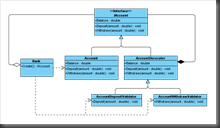 The solution is the Decorator pattern. With this pattern we can add new responsibility to an object without changing its internals.
For simplicity purpose we will take a simple sample that anyone can understand but the concept shown here can apply to much more complex object.
Four our sample we will take a bank account. On this account we should be able to to money deposit and withdraw. The class diagram on the right illustrate this design.
Let’s start by defining our IAccount interface
namespace Model
{
   public interface IAccount {
       string AccountNumber { get; }
       decimal Balance { get; }
       bool Active { get; }
       void Deposit(decimal amount);
       void Withdraw(decimal amount);
       void Close();
   }
}
This simple interface will be the central abstraction of the system. The goal is to never depends on concrete class and this interface in enough to add a lot of functionality around an account.
Now here the interface implementation as an Account:
using System.Diagnostics;

namespace Model
{
   [DebuggerDisplay("Account = {_accountNumber}, Balance = {_balance}")]
   public class Account : IAccount
   {
       public string AccountNumber { get; private set; }
       public decimal Balance { get; private set; }
       public bool Active { get; set; }

       internal Account(string accountNumber, decimal balance)
       {
           AccountNumber = accountNumber;
           Balance = balance;
           Active = true;
       }

       public void Deposit(decimal amount)
       {
           if (OnBeforeDeposit())
               Balance += amount;
           OnAfterDeposit();
       }

       protected virtual bool OnBeforeDeposit()
       {
           return true;
       }

       protected virtual void OnAfterDeposit() { }

       public void Withdraw(decimal amount)
       {
           if (OnBeforeWithdraw())
               Balance -= amount;
           OnAfterWithdraw();
       }

       protected virtual bool OnBeforeWithdraw()
       {
           return true;
       }

       protected virtual void OnAfterWithdraw() { }

       public void Close()
       {
           if (OnBeforeClose())
               Active = false;
           OnAfterClose();
       }

       protected virtual bool OnBeforeClose()
       {
           return true;
       }

       protected virtual void OnAfterClose() { }
   }
}
If you expand the previous block of code you will see that the implementation of IAccount is only doing business stuff. There is no other responsibility in this class than the one that is meant for. We can clearly see “Template Method” design pattern here. All “OnSomething()” method are protected and any derided class can add implementation around the process. All “Before” method can cancel the process if the return value is false. This allow extension classes to add some specific behaviour.
But one of the main thing missing in this class is “validation”. We will use the decorator pattern to do that. A decorator class is a class thst implement all the member of an abstraction and forward all the calls to an internal instance of a real implementation that abstraction. In our case the abstraction is “IAccount” so we have to make a decorator that implement that interface.
namespace Model.Decorator
{
   public abstract class AccountDecorator : IAccount
   {
       private readonly IAccount _account;

       protected IAccount Account
       {
           get { return _account; }
       }

       protected AccountDecorator(IAccount account)
       {
           _account = account;
       }

       public string AccountNumber
       {
           get { return Account.AccountNumber; }
       }

       public decimal Balance
       {
           get { return Account.Balance; }
       }

       public bool Active
       {
           get { return Account.Active; }
       }

       public virtual void Deposit(decimal amount)
       {
           Account.Deposit(amount);
       }

       public virtual void Withdraw(decimal amount)
       {
           Account.Withdraw(amount);
       }

       public virtual void Close()
       {
           Account.Close();
       }
   }
}
As you can see the constructor of the decorator takes an instance of “IAccount”. All method forward their call to that instance. This base class simplifies the process of creating concrete decorator by allowing other decorator to implement some but not all members of the interface.
Now is the time to start implementing our validation class structure. For that purpose we will create a base validation class that will be responsible of applying the validation the IAccount instance.
using System.Collections.Generic;
using Model.Decorator;

namespace Model.Validator
{
   public abstract class AccountValidatorBase : AccountDecorator
   {
       protected abstract IEnumerable<IValidation> GetValidations(decimal amount);

       protected AccountValidatorBase(IAccount account) : base(account) {}

       protected void Validate(decimal amount)
       {
           foreach (var validation in GetValidations(amount))
               if (!validation.IsValid)
                   throw validation.Exception;
       }
   }
}
This simple base class define a “GetValidations” method that all derived class must override to add a list of validation to perform on method call.
Now to implement the “Deposit” validation we have to create this class:
using System.Collections.Generic;
using Model.Validation;

namespace Model.Validator
{
   public class AccountDepositValidator : AccountValidatorBase
   {
       public AccountDepositValidator(IAccount account) : base(account) {}

       protected override IEnumerable<IValidation> GetValidations(decimal amount)
       {
           return new List<IValidation>
           {
               new AmountGreaterThanZeroValidation(amount),
               new AmountShouldHaveOnlyTwoDecimals(amount),
               new AccountMustBeActiveValidation(Account),
               new DepositAmountNotExceedMaxValidation(Account, amount)
           };
       }

       public override void Deposit(decimal amount)
       {
           Validate(amount);
           Account.Deposit(amount);
       }
   }
}
This class is responsible for creating all validation instances. The “Deposit” method is overridden to call the base “Validate” method before doing the actual deposit.
To implement those validation we need to define the “IValidation” interface.
using System;

namespace Model.Validator
{
   public interface IValidation
   {
       bool IsValid { get; }
       Exception Exception { get; }
   }
}
Here is a sample implementation:
using System;
using Model.Validator;

namespace Model.Validation
{
   public class AmountGreaterThanZeroValidation : IValidation
   {
       public AmountGreaterThanZeroValidation(decimal amount)
       {
           Amount = amount;
       }

       public decimal Amount { get; set; }

       public bool IsValid
       {
           get { return Amount > 0; }
       }

       public Exception Exception
       {
           get { return new ArgumentOutOfRangeException("amount", Amount, "Deposit amount should be greater than 0."); }
       }
   }
}
All other validations used in “AccountDepositValidator” can be described the same way.
The last step is to create an actual “IAccount” that will implement all this stuff. To do that we will need a Bank class. A bank is responsible of creating account. It will also be responsible of decorating it with all necessary decorators.
using System;
using System.Collections.Generic;
using Model.Logging;
using Model.Validator;

namespace Model
{
   public static class Bank
   {
       static readonly SortedDictionary<string, IAccount> _accounts = new SortedDictionary<string, IAccount>();
       private static int _accountSequence = 1;

       public static IAccount CreateAccount(decimal balance)
       {
           string accountNumber = String.Format("A{0:0000}", _accountSequence++);
           IAccount account = new Account(accountNumber, balance);
           account = new AccountDepositValidator(account);
           _accounts[account.AccountNumber] = account;
           return account;
       }
   }
}
To illustrate this process in action here is a sequence diagram:
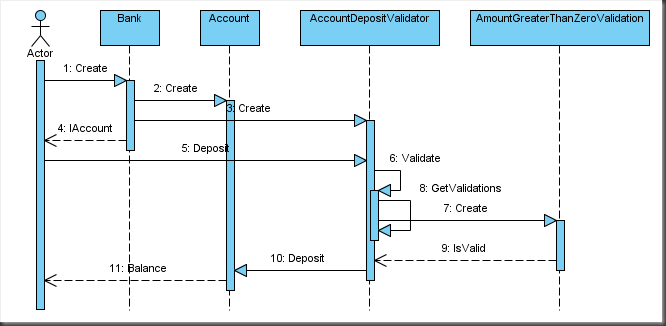
- Call Bank.CreateAccount.
- The Bank instantiate an Account class.
- The Bank create an AccountDepositValidator and wrap Account with it
- The Bank return an instance of IAccount.
- Deposit is called on IAccount which is an instance of AccountDepositValidator
- AccountDepositValidator call Validate
- AccountDepositValidator call GetValidations to retrieve the list of validation to evaluate
- An AmountGreaterThaZeroValidation is created
- IsValid returns true
- AccountDepositValidator call base Deposit method
- Balance value is updated
Next
With all this in place the only thing left to do is to implement all the other validators for all method of “IAccount”.


 Posts
Posts


